
xltnapps-octotrip-rental-cars
mcpsmithery# OctoTrip Rental Cars MCP Server Free, no-login MCP server for discovering and comparing rental cars with real-time pricing from multiple providers worldwide. **MCP Streamable HTTP Endpoint:** ``` https://mcp.octotrip.app/rental-cars/mcp ``` 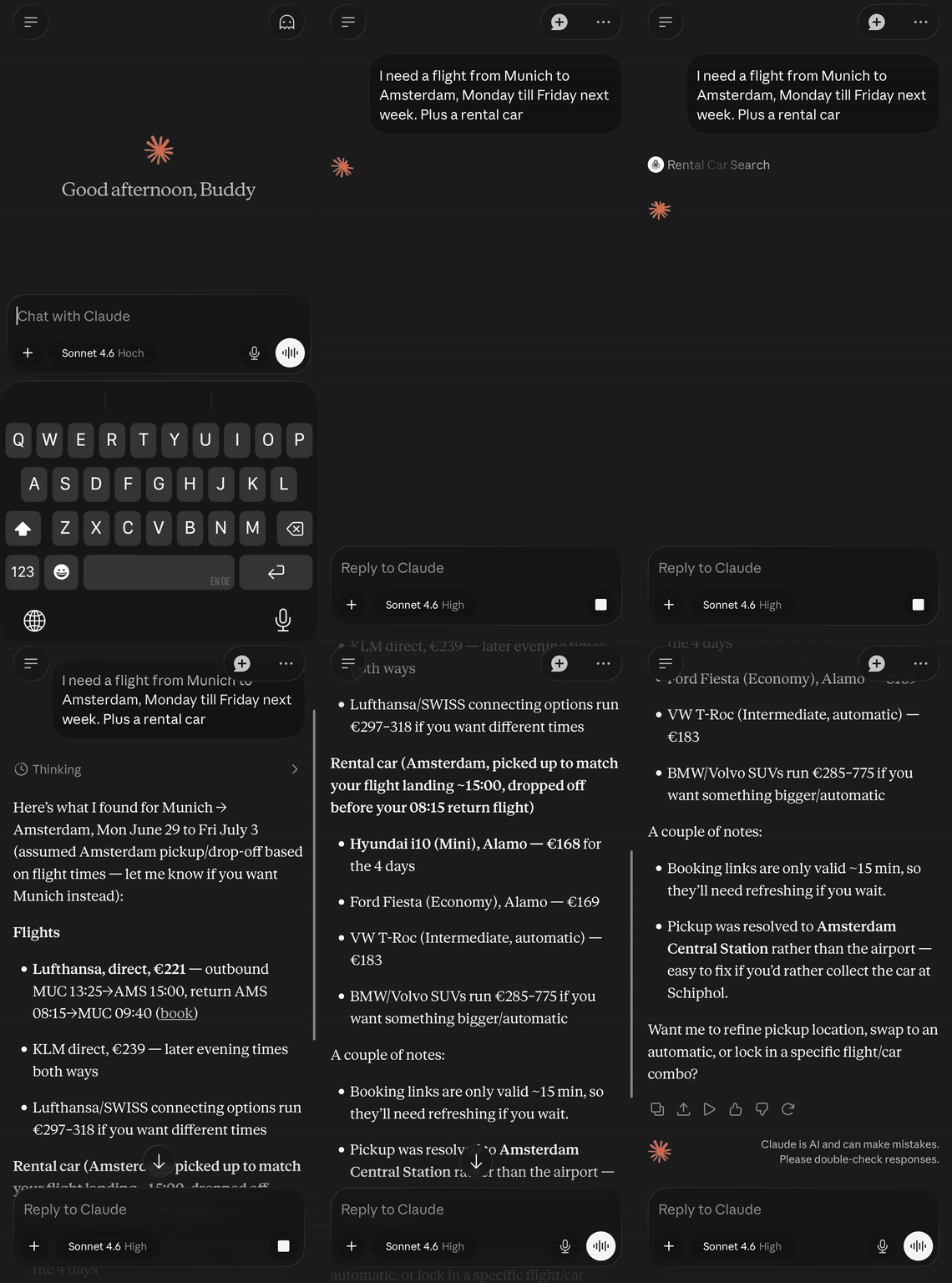 ## Related - [OctoTrip Flights](https://github.com/octotrip/flights) — flight search MCP server ## Affiliate Disclosure OctoTrip is free to use. Booking links contain affiliate attribution -- OctoTrip may earn a commission at no extra cost to you. Search results are ranked by price within each car category, not by affiliate payout. ## Quick Start Add to your MCP client configuration: ```json { "mcpServers": { "octotrip-rental-cars": { "url": "https://mcp.octotrip.app/rental-cars/mcp" } } } ``` No API key or login required. ## Use with... <details> <summary><strong>Claude Desktop</strong></summary> Add to `claude_desktop_config.json`: ```json { "mcpServers": { "octotrip-rental-cars": { "url": "https://mcp.octotrip.app/rental-cars/mcp" } } } ``` </details> <details> <summary><strong>Cursor / Windsurf</strong></summary> Add to your MCP settings: ```json { "mcpServers": { "octotrip-rental-cars": { "url": "https://mcp.octotrip.app/rental-cars/mcp" } } } ``` </details> <details> <summary><strong>Cline</strong></summary> Add to your Cline MCP settings: ```json { "mcpServers": { "octotrip-rental-cars": { "url": "https://mcp.octotrip.app/rental-cars/mcp" } } } ``` </details> <details> <summary><strong>LobeHub</strong></summary> [](https://lobehub.com/mcp/octotrip-rental-cars) </details> <details> <summary><strong>OpenClaw</strong></summary> ```bash openclaw plugins install clawhub:@xltnapps/octotrip-rental-cars ``` </details> <details> <summary><strong>Smithery</strong></summary> Install via [Smithery](https://smithery.ai/servers/xltnapps/octotrip-rental-cars): ```bash npx -y @smithery/cli install xltnapps/octotrip-rental-cars --client claude ``` </details> <details> <summary><strong>Hermes Agent</strong></summary> ```bash hermes mcp add octotrip-rental-cars --url https://mcp.octotrip.app/rental-cars/mcp hermes mcp test octotrip-rental-cars ``` Or add to `~/.hermes/config.yaml`: ```yaml mcp_servers: octotrip_rental_cars: url: "https://mcp.octotrip.app/rental-cars/mcp" ``` </details> <details> <summary><strong>Stdio-only clients</strong></summary> For MCP clients that only support stdio transport: ```bash npx mcp-remote https://mcp.octotrip.app/rental-cars/mcp ``` </details> <details> <summary><strong>curl / Protocol Example</strong></summary> A complete MCP session using curl (initialize, list tools, call search): ```bash # 1. Initialize curl -s -X POST https://mcp.octotrip.app/rental-cars/mcp \ -H "Content-Type: application/json" \ -H "Accept: application/json, text/event-stream" \ -d '{ "jsonrpc": "2.0", "id": 1, "method": "initialize", "params": { "protocolVersion": "2025-03-26", "capabilities": {}, "clientInfo": {"name": "example", "version": "1.0"} } }' # 2. List tools curl -s -X POST https://mcp.octotrip.app/rental-cars/mcp \ -H "Content-Type: application/json" \ -H "Accept: application/json, text/event-stream" \ -d '{"jsonrpc": "2.0", "id": 2, "method": "tools/list"}' # 3. Search curl -s -X POST https://mcp.octotrip.app/rental-cars/mcp \ -H "Content-Type: application/json" \ -H "Accept: application/json, text/event-stream" \ -d '{ "jsonrpc": "2.0", "id": 3, "method": "tools/call", "params": { "name": "search", "arguments": { "location": "Munich Airport", "pickup_date": "2026-08-01", "dropoff_date": "2026-08-07" } } }' ``` Transport: stateless streamable HTTP. Responses use `text/event-stream` (SSE). No session persistence or resumability. Rate limit: 1 request/second with burst capacity of 5. </details> ## Tool: `search` Searches live rental-car offers for a pickup location and rental period. Returns available cars from multiple vendors grouped by category (economy, compact, SUV, etc.), showing the cheapest options in each. The tool queries external provider APIs in real time and may include affiliate booking links. It does not book cars, modify reservations, charge users, or store user data. ### Parameters | Parameter | Type | Required | Default | Description | |---|---|---|---|---| | `location` | string | yes | -- | Pickup location: city, airport, station, address, or landmark | | `pickup_date` | string | yes | -- | Pickup date (YYYY-MM-DD, DD.MM.YYYY, or natural-language) | | `dropoff_date` | string | yes | -- | Dropoff date, must be after pickup date | | `dropoff_location` | string | no | same as pickup | Different dropoff location for one-way rentals | | `pickup_time` | string | no | `"12:00"` | Pickup time in 24-hour HH:MM format | | `dropoff_time` | string | no | `"12:00"` | Dropoff time in 24-hour HH:MM format | | `currency` | string | no | `"EUR"` | ISO 4217 currency code (EUR, USD, GBP, etc.) | | `language` | string | no | `"en"` | Response language code (en, de, etc.) | | `age` | integer | no | `30` | Driver age, minimum 18 (younger drivers may incur surcharges) | ### Response Format Results are grouped by SIPP car category with the cheapest 2 options per group: ```json { "results": [ { "name": "Volkswagen Golf", "vendor": "Europcar", "sipp": "CDMR", "category": "Compact", "price": 181.03, "price_per_day": 45.26, "pay_now": 181.03, "pay_later": 0, "currency": "EUR", "transmission": "manual", "passengers": 5, "bags": 1, "doors": 4, "air_con": true, "fuel_policy": "Full to Full", "mileage": "Unlimited", "free_cancellation": true, "free_amendment": true, "deposit": 800, "excess": 950, "included_protections": ["Collision Damage Waiver", "Theft Protection"], "image_url": "https://...", "booking_url": "https://...", "link_type": "affiliate", "affiliate_disclosure": "This link contains affiliate attribution. OctoTrip may earn a commission at no extra cost to you." } ], "total": 23, "total_available": 379, "rental_days": 4, "pickup_location_resolved": "Munich International Airport", "dropoff_location_resolved": "Munich International Airport", "query": { ... } } ``` ### Error Responses The server returns structured errors with suggestions: - **`location_not_found`** -- location could not be resolved. Try a more specific name or airport. - **`invalid_date`** -- date format not recognized. Use YYYY-MM-DD, DD.MM.YYYY, or similar. - **`no_results`** -- no cars available for the given criteria. Try different dates or a nearby location. ## Example Prompts - Find me a cheap rental car at Amsterdam Schiphol for next weekend - Compare automatic SUVs available in Munich Airport for July 10-15 - I need a car in Barcelona from August 1-14, budget around 30 EUR/day - One-way rental from Berlin to Hamburg, picking up Friday, returning Monday - What's the cheapest economy car at London Heathrow for a week in September? ## Privacy This server does not log IP addresses, search queries, or any user-identifiable data. See [PRIVACY.md](PRIVACY.md) for full details including sample log entries. ## Security To report a vulnerability, see [SECURITY.md](SECURITY.md). ## License MIT
By Smithery | 3 findings | Scanned 7/12/2026 | tooltrust-scanner/v0.3.19
Repository health
Popularity and maintenance signals alongside the security grade.
Not collected
Not collected
GitHub metadata pending
Not collected
GitHub metadata pending
Not collected
GitHub metadata pending
Not collected
GitHub metadata pending
Not collected
Latest GitHub release
Stars trend
Daily star additions · History data pending
No observed star events yet.
Pull request activity
Weekly PR events · History data pending
No observed PR events yet.
Risk Summary
Safe With Normal ControlsExcessive Permissions is the main signal, but overall risk remains within an acceptable range.
Potential impact: The agent may gain overly broad access to files, network, databases, or execution capabilities.
Recommended action: No high-risk findings were detected in this scan, but you should still apply least-privilege defaults and rescan after changes.
Suggested policy: keep this tool behind manual approval, do not allow unattended runs, and re-scan after narrowing risky permissions.
Security Findings (3)
search:tool performs network or execution operations but declares no rate-limit, timeout, or retry configuration
Fix: Declare explicit rate-limit, timeout, and retry configuration for all network and execution tools. Implement exponential back-off and surface resource state to the calling agent.
search:declared capabilities: network access
Fix: Tool requests broad permissions (exec/fs/network). Validate input parameters using Enums where possible, and restrict file system operations to explicit allowed directories.
search:Tool did not expose metadata.dependencies or repo_url, so supply-chain coverage is limited.
Fix: Review and remediate the identified issue.
Scan this tool yourself
Reproduce this audit locally, integrate into CI, or let your agent audit its own tools.
Install once, then scan any MCP server:
$ curl -sfL https://raw.githubusercontent.com/AgentSafe-AI/tooltrust-scanner/main/install.sh | bash$ tooltrust-scanner scan --server "npx -y xltnapps-octotrip-rental-cars"Adjust the package name if your npm registry name differs from the tool ID. View source
Add badge to your README
Copy this Markdown to show your ToolTrust grade on GitHub.
[](https://github.com/AgentSafe-AI/tooltrust-directory)